

How To Bypass Windows Vista Login Password
4 Tips to Reset Windows Vista Password When You Forgot It
What should you do when you lot forgot the password to login to Windows Vista? Inquire an ambassador to reset the Vista password for you. If yous yourself are administrator, and you can't remember the ambassador password, the problem get a little catchy, and probably hard to recover the 'forgotten password' again. Before you search for Windows installation DVD to format and reinstall Windows Vista onto the computer, here a few ways you lot tin try to unlock the Windows to gain access to the system over again, at least by resetting Windows Vista password.
Method 1: Employ Windows Vista Password Reset Disk
If you did create the Windows Vista password reset disk before forgot Windows Vista password, the method will exist helpful. While, there are exactly little users who think to gear up such a useful disk. If you lot already have a Windows Vista password reset disk, please follow these steps to reset your Vista password easily.
-
Once y'all've typed the wrong password, Windows Vista will bear witness a Reset password link below the login box.
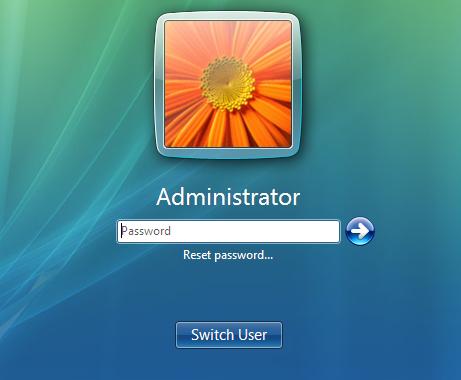
- Click on Reset countersign. Make sure that password reset disk is plugged into the reckoner at this betoken.
- When the Password Reset Wizard appears, click Next to continue.
- Select the correct countersign reset disk. Click Side by side.
- Blazon in a new countersign and a hint for the countersign. Click Side by side.
- Click Finish. Now yous tin can log in to your PC with the new password.
Method 2: Reset Windows Vista Countersign in Safe Mode
In Windows Vista in that location is a hidden account called Ambassador which does not show upwards on the login screen merely it is always bachelor for use if required. If you didn't alter this Ambassador'southward password, the password is empty by default. You can kick upwardly in Safe Mode (past pressing F8 when your computer starts) and log on with the built-in Ambassador account. Later on getting into Windows, you can reset any Vista account password easily!
Method 3: Utilize the Sticky Keys Play tricks to Reset Windows Vista Password
The Viscous Keys trick to restore a forgotten administrator password is reliable, like shooting fish in a barrel to carry out, and does not require third-party software. All yous have to do is boot upwards from a Windows Vista setup DVD, launch the Windows Recovery Environment (RE), then replace the sethc.exe file with cmd.exe. Yous tin can too use this method for Windows 7, but y'all have to employ a Vista or Windows seven DVD.
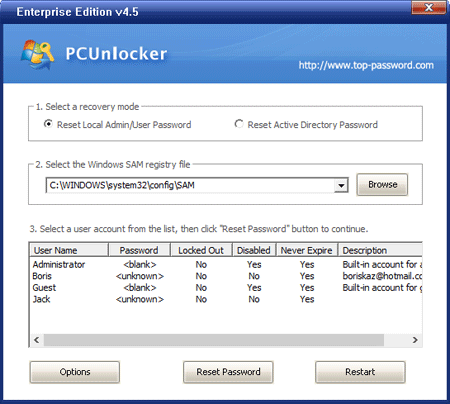
Method iv: Reset Windows Vista Password by Third-political party Software
- Download the self-extracting Zip file of PCUnlocker packet.
- Uncompress the bundle, there is a ISO epitome: pcunlocker.iso. Burn down it onto a CD/DVD or USB flash bulldoze.
- Boot your locked Vista reckoner from the newly burned CD/DVD or USB flash bulldoze.
- Look until the boot procedure is finished. When a window pops up with all your Windows Vista accounts, select the target one to reset its forgotten password.
Related Manufactures


How To Bypass Windows Vista Login Password,
Source: https://www.top-password.com/knowledge/reset-windows-vista-password.html
Posted by: maldonadosoused.blogspot.com
0 Response to "How To Bypass Windows Vista Login Password"
Post a Comment